Living
Image
A still architectural render, turned into software you can explore. Move the sun from morning to dusk, then export any moment.
Visit the live platform ↗One slider.
A whole day.
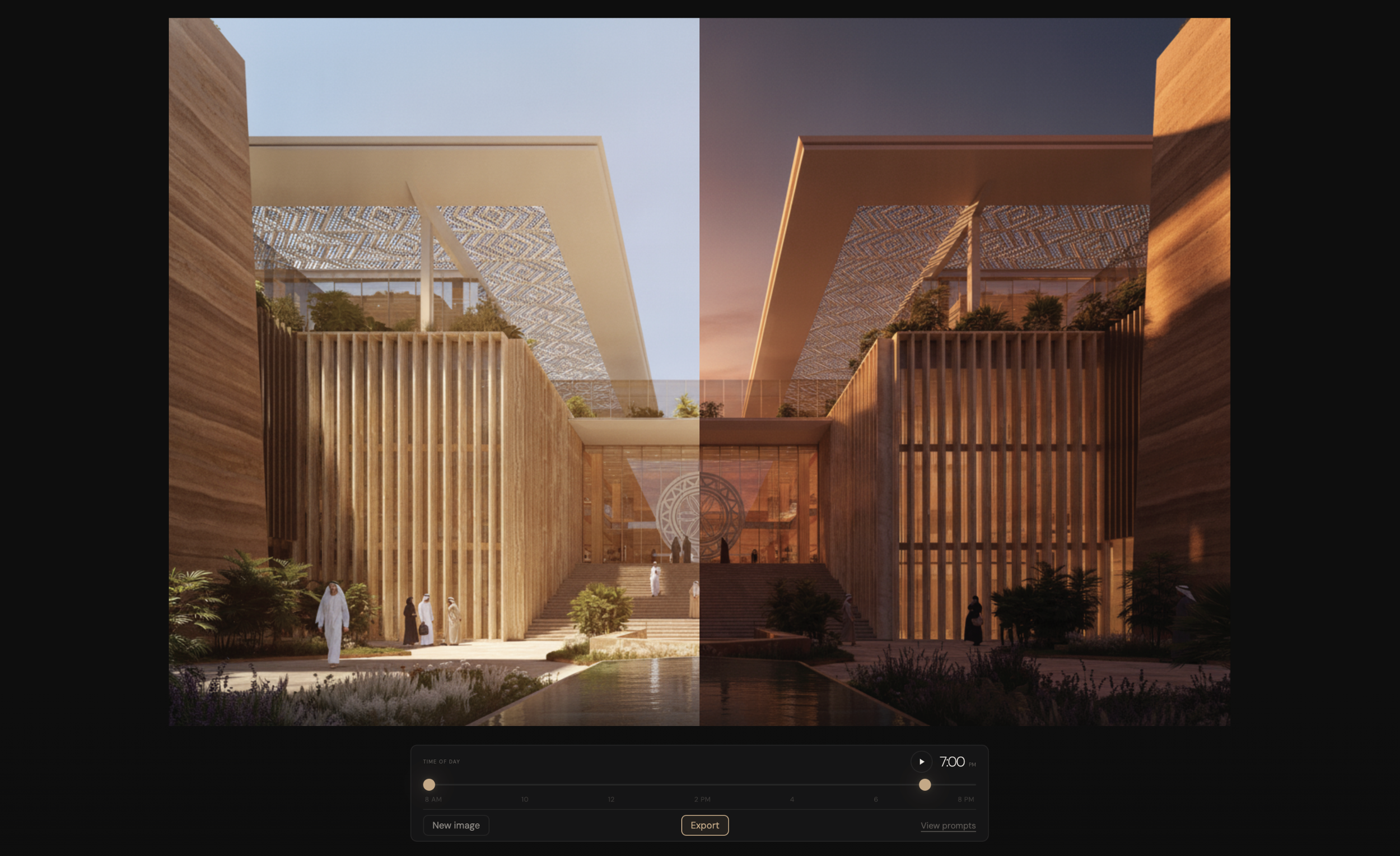
One still render in. Thirteen generated hours out, crossfaded in the browser.
Drag from 8 AM to 8 PM and the shadows swing, the sky turns, the facade warms. Export any moment, or the whole arc as a timelapse.
Customers receive an application, not a still image.
Living Image is the MVP of a broader project. Instead of providing still images, customers receive an application, enabling real-time environmental decisions in the visualization.
A render captures one hour of one day, then it's finished. The building it depicts will stand through every hour for decades. Asking for a different time of day means re-opening the 3D model, re-rendering, re-invoicing.
Thirteen renders that agree on everything but the light
Users have the ability to change time of day, while exporting images and time-lapses. For that to work, every frame across the day has to be the same building — same geometry, same windows, same materials, same camera.
Crossfade two frames that disagree about geometry and you get ghosting. So the real task wasn't rendering. It was forcing a generative model to be deterministic.
What I tried, and what didn't work
While vibe coding a mock up in February 2026 with Claude, it became evident that the model could not produce the deterministic shading techniques necessary for a viable prototype. I shifted my approach to rendering the same images thirteen times through an API, each image a different hour of the day.
The prompt is the product
AI rendering can vary with hallucinations. Ask for the same building twice and a window shifts, a mullion divides differently, a courtyard sprouts trees that were never there. One template, thirteen instances: only the hour, sun position, shadow vector, elevation and Kelvin value change between them.
depict how it would look at {time_label} on a clear day.
CRITICAL — SUN AND SHADOWS
The sun moves from the RIGHT side of the scene
(east) in the morning to the LEFT side (west)
in the evening. At {time_label}:
- Sun position: {sun_position_in_frame}
- Shadow direction: {shadow_direction_explicit}.
All shadows in the image must fall in this
direction — building shadows, tree shadows,
and ground shadows all aligned.
- Sun elevation: {sun_elevation}° above horizon.
- Colour temperature: {color_temp_k}K
- Sun position, lighting direction, and intensity
- Shadow angles, lengths, and softness
- Sky colour gradient and brightness
- Ambient light colour temperature
- Surface reflections and specular highlights
DO NOT CHANGE any of these elements:
- Building geometry, proportions, structural lines
- Window positions, sizes, or shapes
- Material textures, patterns, surface details
- Vegetation shapes, positions, or density — do
not add any trees, plants, shrubs, or vegetation
that are not in the original image; empty
courtyards and open areas must stay empty
- Ground materials and layout
- Camera angle, focal length, and composition
- Any text, signage, or labels in the image
- The number or placement of any objects
Upload once. Explore the day. Export anything.
The end user never writes a prompt. They explore inside the range the sender generated, which keeps every frame on-brand and quality-checked.
Same building, same geometry, thirteen different suns
8:00 AM on the left, 7:00 PM on the right, split down the centre of a single frame. The shadows swing, the sky turns, the rammed earth warms. Nothing about the building moves.
Gemini 2.5 Flash Image
Three adapters were built to a common interface — Gemini, GPT-4o Image and Grok Imagine — and compared on structural fidelity. Gemini won and is the only one registered in production.
FastAPI + adapter registry
Swapping providers is a config change, not a rewrite. Image models change monthly, so the interface is the hedge. 42 tests, written before implementation.
Beyond time of day
The same authored approach extends to weather, seasons and street life. Then sender-side curation and analytics: which hour the client lingered on, and what they downloaded.
One image in.
An application out.
The render stops being the end of the conversation and becomes the start of one.
Visit the live platform ↗